iPhone X Reset
How to Force Restart or Hard Reset iPhone X (does not wipe any data from your phone)
Instead of holding down two buttons until the iPhone restarts, you now need to press two buttons quickly and then press and hold a third button. This takes a little practice, but once you get the hang of it you’re good to go.
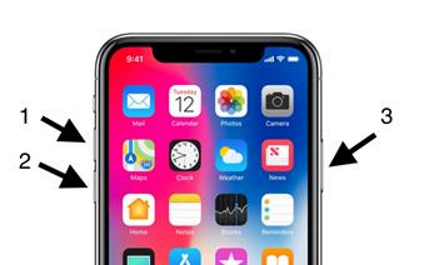
Step 1: Press Volume Up
Quickly press and release the Volume Up button.
Step 2: Press Volume Down
Quickly press and release the Volume Down button.
Step 3: Press and hold Side Button
Press and hold the side button until the Apple Logo appears.
You must press the volume up then volume down pretty quickly, but not at the same time. The Side Button is what Apple calls the power button. After a few seconds of holding the side button, the iPhone X should restart.